Building Managed Redis From Scratch
Redis takes one command to run, so why does every cloud bill you monthly for a managed one? I built it on a platform that does not sell one, to find out what you are actually paying for.
Redis takes one command to run.
1docker run -p 6379:6379 redis:7-alpineThat is it. It is running.
So why does every cloud sell you a managed Redis, and bill you monthly for it?
For most teams, buying it is the right call. It works, it is someone else's problem at 3am, and you ship faster. Buy it.
But it is worth knowing what you are paying for. Because it is not Redis.
What The Button Is Actually Doing
To find out where the difficulty lives, I built managed Redis on a platform that does not sell one. Railway has a general-purpose API and no Redis product. No button, no SDK. Every piece had to be wired by hand.
Four things go behind that button:
- Compute. A container running
redis-server. - Storage. A volume, so the data survives a restart.
- Networking. An address you can reach from outside the platform.
- Lifecycle. Create it, wait for it, tear it down without leaving scraps.
That is the product. Not the database. The database is free.
You are paying someone to wire those four together, and to keep them running.
A Volume Is Not Persistence
This one caught me out immediately.
Mounting a disk at /data does not make Redis write to it. Redis holds everything in memory. It only persists if you tell it to.
So the start command carries the real weight:
1redis-server --requirepass <password> --appendonly yes --dir /data--appendonly yes turns on the append-only file. --dir /data puts that file on the mounted volume.
Miss either flag and you have a database with a disk attached that still loses everything on restart.
I was not consistent about this myself. My local Docker backend mounts the same path but never passes those flags, so it falls back to the image's default snapshotting instead of AOF. Two backends, two different durability guarantees.
That is a decision a provider makes for you. You never see it.
Two Conversations, Not One
Talking to a database is two separate conversations. They never touch.
Managing the box is one. Create it, attach a volume, open a port, delete it. Rare. Over HTTP.
Using the box is the other. SET, GET, PING. Constant. Over a raw TCP socket.
Control plane and data plane.
The code ended up drawing that line by itself. The interface both backends implement has two methods:
1interface RedisProvisioner {2 provision(name: string): Promise<{ id: string; url: string }>;3 destroy(id: string): Promise<void>;4}Those two are the entire control plane.
The data plane is the url that comes back. It never touches this interface again.
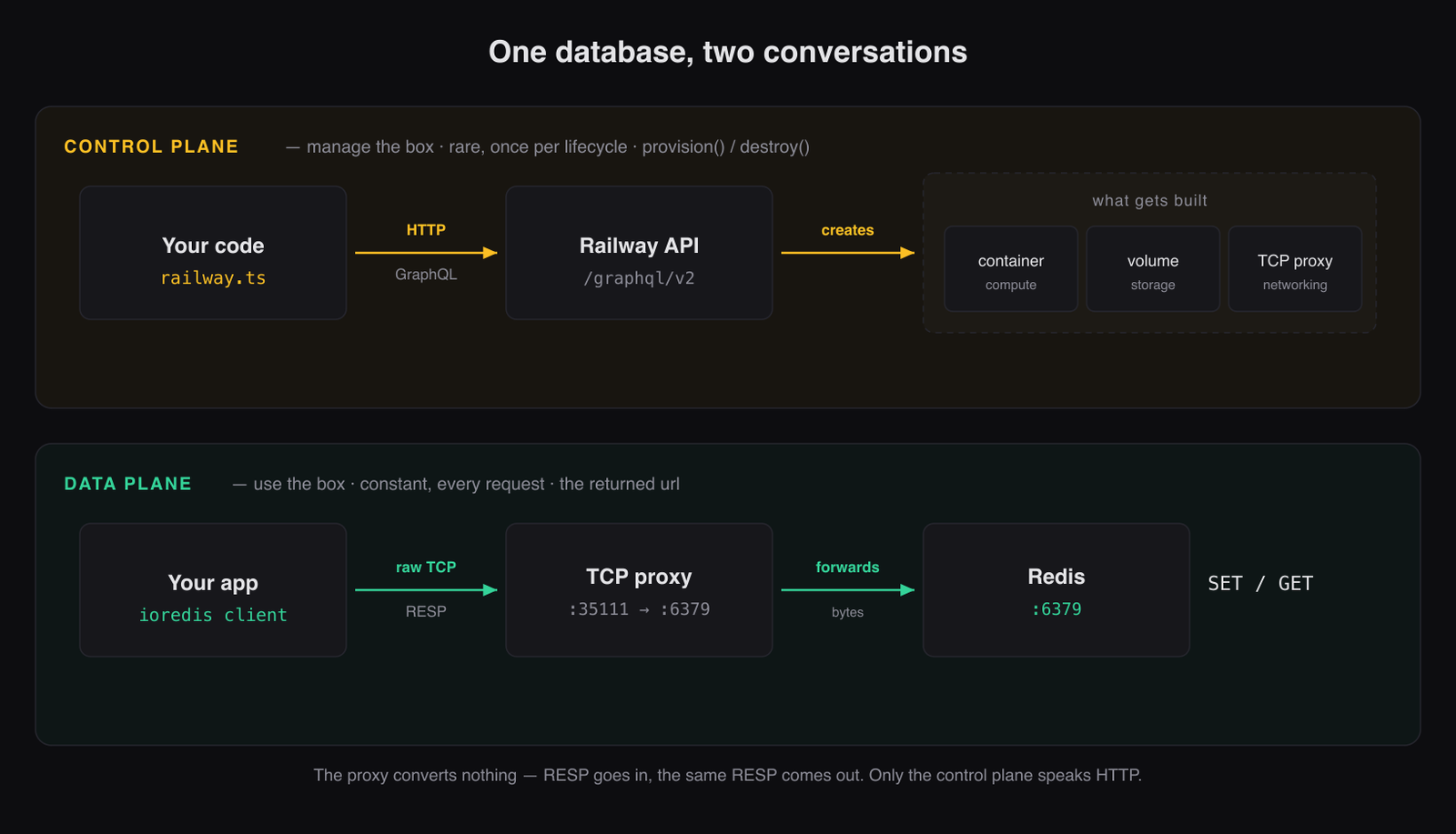
The reason to care is not vocabulary. It is triage.
When something breaks, ask which conversation died. That one question tells you how bad it is:
- Control plane down -> nobody provisions anything new -> every database already running keeps serving traffic -> no user notices.
- Data plane down -> your app is failing reads right now.
Same product. Completely different severity.
Providers build the two as separate systems partly so that one cannot take the other down with it.
Redis Does Not Speak HTTP
TCP, HTTP and GraphQL are not three options. They are a stack. TCP moves bytes and has no opinion about what they mean. HTTP is one language spoken over it. GraphQL is a convention for using HTTP.
Redis sits beside HTTP, not on top of it. It defines its own protocol, RESP, straight over TCP.
So the URL Railway returns is not a web address:
1redis://default:•••@tokaido.proxy.rlwy.net:35111You cannot open it in a browser or fetch() it. It is a host and a port for a socket a client opens and holds.
RESP is small enough to speak by hand. The readiness check has no Redis client in it, just a socket and two inline commands:
1AUTH <password>2PING3 -> +OK +PONGIf +PONG comes back, a real Redis is on the other end. That is the entire probe.
The Container Has No Public Address
Locally this never comes up. docker run -p 6379:6379 and you are done.
Railway containers are private by default. Correct posture, but it means there is no address your machine can dial. Not the wrong protocol. No route at all.
So something public has to sit in front and pass connections inward. That is a TCP proxy.
It reads nothing. It accepts a connection on a public host and port, then forwards the bytes unchanged into the private container. Nothing in the path translates anything, because nothing needs to.
tcpProxyCreate takes applicationPort: 6379 and hands back { domain, proxyPort }. Whatever arrives at that public port comes out at 6379 inside.
Same primitive as -p 6379:6379 on a laptop. Different mechanism.
Finding A Mutation The Docs Do Not Mention
Railway documents adding a TCP proxy by clicking a button in the dashboard. It does not document the API call behind that button.
That is a problem when scripting it is the entire point.
GraphQL has an escape hatch. The spec requires every server to be able to describe its own schema, through meta-fields that start with __.
So instead of hunting through docs, ask the API what it can do:
1query {2 __type(name: "Mutation") {3 fields { name args { name type { kind name } } }4 }5}That printed tcpProxyCreate, its input shape of { environmentId, serviceId, applicationPort }, and a return type of { domain, proxyPort }. Exactly the public endpoint needed. Undocumented, and sitting in the schema the whole time.
The errors turn into a second source of truth:
Cannot query field "x"-> the field does not exist.Not Authorized, or a missing-argument complaint -> it exists and you called it wrong.
That distinction is useful when you are guessing. And it works on any GraphQL API. GitHub, Shopify, Linear.
The schema explorers everyone uses are a UI over these same queries.
Six Mutations, In An Order That Matters
With the schema in hand, provisioning comes out as six mutations. The ordering is most of the work. You cannot attach a volume to a service that does not exist, and you cannot proxy a port with nothing behind it.
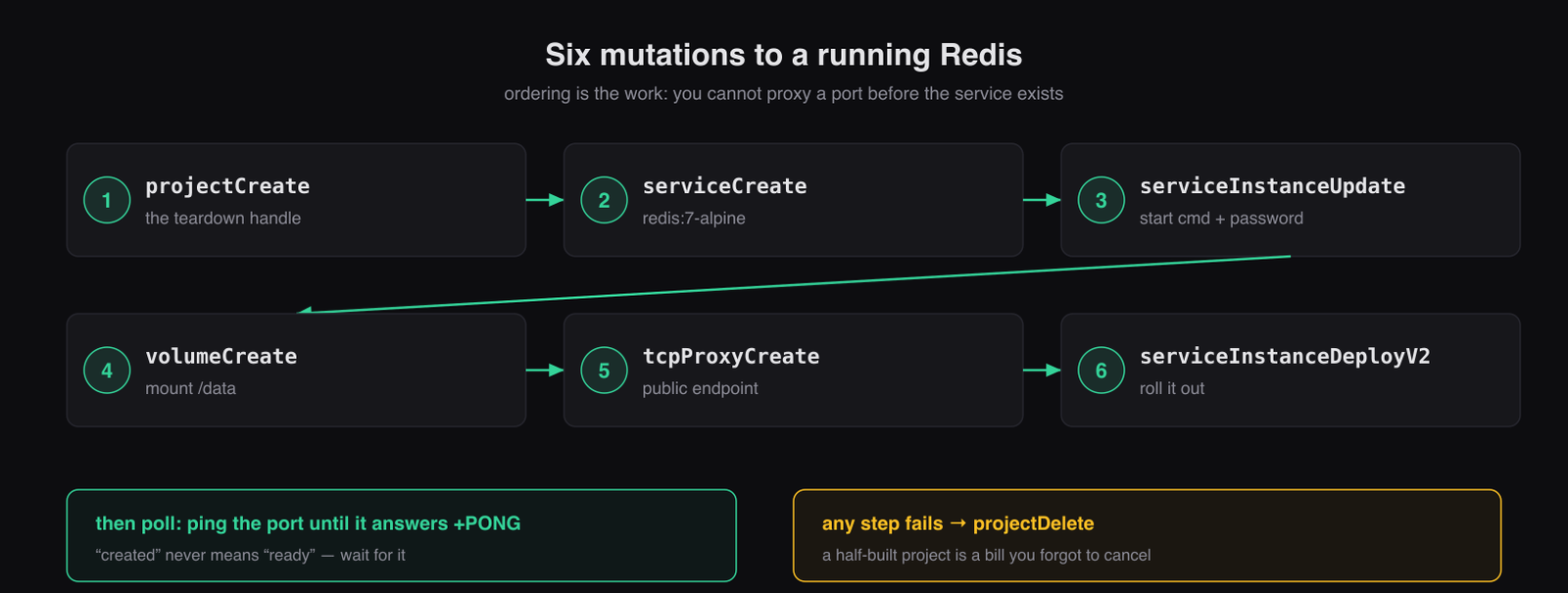
One thing to watch. projectCreate returns its environments as a GraphQL connection, so the environment ID comes out of environments.edges[0].node.id. A fresh project has exactly one environment, so index zero is safe here. Anywhere that mattered, I would look it up by name.
Created Does Not Mean Ready
The create call returns immediately. Redis is not up.
The platform is still pulling an image and booting a container. Hand back the URL at that moment and the caller's first SET hits a refused connection.
So you poll. Retry the RESP ping until it answers.
What surprised me was how differently patient the two backends have to be:
- Local Docker: 20 attempts, 500ms apart. About ten seconds.
- Railway: 60 attempts, 3 seconds apart. Three minutes.
An 18x gap, and it comes down to one line.
Locally the image gets pulled in its own step, before the clock starts. On Railway the platform pulls it during deploy, inside the window being timed.
So the retry budget is not measuring Redis at all. It is measuring an image pull in someone else's data center.
A one-minute ceiling was my first guess. It was not enough.
The same problem shows up everywhere. Kubernetes readiness probes. Load balancer health checks. Docker healthchecks. They exist because creation and readiness are separate events, and only one of them is easy to detect.
The Part That Costs You Money
Provisioning is a transaction with no rollback.
Step four of six fails and you have already created a project, a service, and a volume. They exist. They bill you. They belong to nothing.
So from the moment the project exists, everything after it runs under a guard:
1const { projectCreate } = await this.gql(/* create project */);2try {3 // serviceCreate, serviceInstanceUpdate, volumeCreate,4 // tcpProxyCreate, serviceInstanceDeployV25 await retry(() => ping(domain, proxyPort, password, 4000), { attempts: 60, delayMs: 3000 });6 return { id: projectCreate.id, url };7} catch (err) {8 await this.destroy(projectCreate.id).catch(() => undefined); // one projectDelete takes it all9 throw err;10}The first real run hung on a cold start and left a project alive.
A hang is not an exception. The catch never fired. The guard could not help, because it only catches failures that throw.
I found the orphan by listing projects, and deleted it by hand.
The honest fix is a timeout around the whole provision, not just around the ping, so that stuck becomes a throwable failure like everything else. Right now the retry ceiling bounds the polling and nothing bounds the five mutations before it.
What Managed Was Really Hiding
Both backends implement the same two methods, so the differences read side by side. The sharpest one is not in provisioning. It is in teardown.
On Railway, destroy is a single mutation. projectDelete. The container, the volume, and the proxy all go with it.
On Docker, you inspect the container to find its mounts, remove the container, then remove each volume separately and tolerate a failure on each one.
A managed service is not just the wiring. It is owning the whole set as one unit, so that deleting it cannot leave debris behind.
Provisioning is the easy half. Guaranteeing nothing survives the delete is the half you are paying for.
What You Are Really Paying For
Not Redis. Redis is free.
Compute. Storage. Networking. Lifecycle. Wired together by someone else.
And the point of building it by hand is not that you would ship your own. You would not. Buy the managed one.
The point is what you keep afterwards.
You have a first question when something breaks. Control plane or data plane. That tells you whether users are affected before you open a single log.
You walk a broken connection from the bottom up, checking whether TCP connects at all before you start suspecting auth or protocol.
You stop trusting that created means usable in any API.
And when the docs come up short on a GraphQL API, you introspect it instead of guessing.
Source code: github.com/intojhanurag/redis-as-a-service